Sequencing flow with the interview order builder
Docassemble is a goal-directed system that seeks out variables as needed. However, every production AssemblyLine interview relies on a central Interview Order block (mandatory: True) to ensure that users encounter screens, introductory text, list-gathering loops, and review screens in a logical, guided sequence.
Click the Interview order button in the left navigation rail to open the visual flow builder:
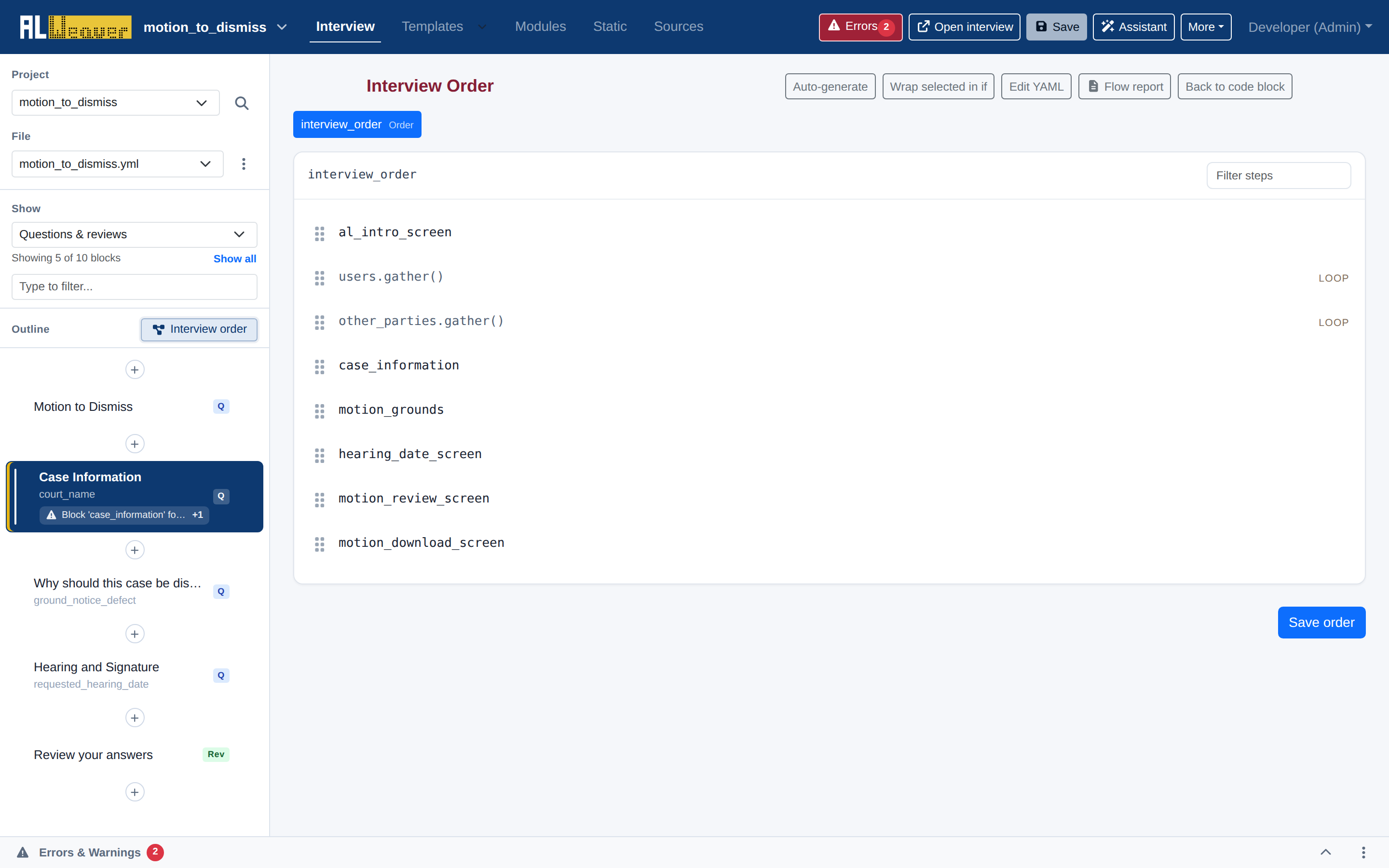
The interview order block
Behind the scenes, the Order Builder manages a mandatory: True code block (by default with id: interview_order):
---
id: interview_order
mandatory: True
code: |
  al_intro_screen
  set_progress(10)
  users.gather()
  other_parties.gather()
  set_progress(40)
  case_information
  if user_is_low_income:
    fee_waiver_screen
  motion_grounds
  set_progress(80)
  hearing_date_screen
  motion_review_screen
  motion_download_screen
Types of flow steps
The Order Builder represents each flow element visually with distinct badges and formatting:
- Screen Steps: Individual question screens (e.g.,
al_intro_screen,case_information). - List Gather Steps (
LOOP): Calls.gather()on anALPeopleListor list object to trigger iterative questions for all members of the list. - Conditional Branches (
IF/ELSE): Branches that display specific screens only when a condition evaluates toTrue. - Progress Indicators (
PROGRESS): Updates the on-screen progress bar percentage (e.g.,set_progress(50)). - Section Dividers (
SECTION): Marks the active navigation section in the progress outline (e.g.,nav.set_section('case')). - Code Steps: Custom Python expressions or calculations executed silently between screens.
Visual reordering and branching controls
- Drag-and-Drop Reordering: Grab the drag handle () beside any step to move it up or down in the sequence.
- Wrap selected in if: Check the selection box next to one or more steps and click this button to nest them inside a conditional branch.
- Auto-generate: Infers a draft interview sequence based on your declared question blocks, people lists, and document bundles.
- Edit YAML: Switch to inline code view to make manual Python adjustments to the order block.
Next steps
- Configure template output and bundles in Document bundles and templates.
- Add a summary review block in Review screens.