The Assembly Line Weaver
The Assembly Line Weaver is the official visual authoring environment for Docassemble and the Document Assembly Line. It provides a visual WYSIWYM (What You See Is What You Mean) workspace that lets you build, preview, sequence, and refine guided legal interviews—from a freshly labeled DOCX or PDF template all the way to a production-ready application.
Launch the Weaver Launch the legacy wizard
The linear wizard-style Weaver is still available, but is no longer actively maintained. We recommend using the visual Weaver for all new interviews and ongoing maintenance.
The Weaver operates directly on your Docassemble Playground projects. Any changes you save in the Weaver are immediately stored in your Playground files and can be run, debugged, or committed to version control.
Why use the Weaver?
Traditional Docassemble interview creation previously required either writing hundreds of lines of YAML and Python by hand or running a one-time linear wizard. The Weaver combines the speed of automated template scaffolding with the control of a full IDE:
- Continuous, non-linear editing: Modify screen questions, reorder steps, add conditional branching, and adjust template mappings at any point without restarting a wizard.
- Instant screen previews: See how each question screen looks in real time using Docassemble's native stylesheets across desktop, tablet, and mobile viewports.
- Visual interview order builder: Structure your interview flow, loops, progress bars, and conditional branches with an intuitive drag-and-drop hierarchy.
- Standard AssemblyLine library integration: Pull pre-built, plain-language question components for names, addresses, language interpreters, and demographics directly into your interview.
- Document bundle assembly: Visually organize multiple DOCX and PDF templates into download packages with conditional inclusion rules.
- Safe project-wide refactoring: Rename variables across YAML interviews, DOCX templates, and Python modules with semantic AST awareness that preserves ordinary text and prose.
- Built-in quality diagnostics: Catch missing IDs, duplicate blocks, undefined variables, and style warnings before running your interview.
- Integrated GitHub publishing: Commit and push changes to GitHub repositories right from the browser.
Watch a demonstration of the Weaver:
Start-to-finish workflow overview
Building an interview with the Weaver follows a streamlined path from initial document preparation to deployment:
Workspace layout and navigation
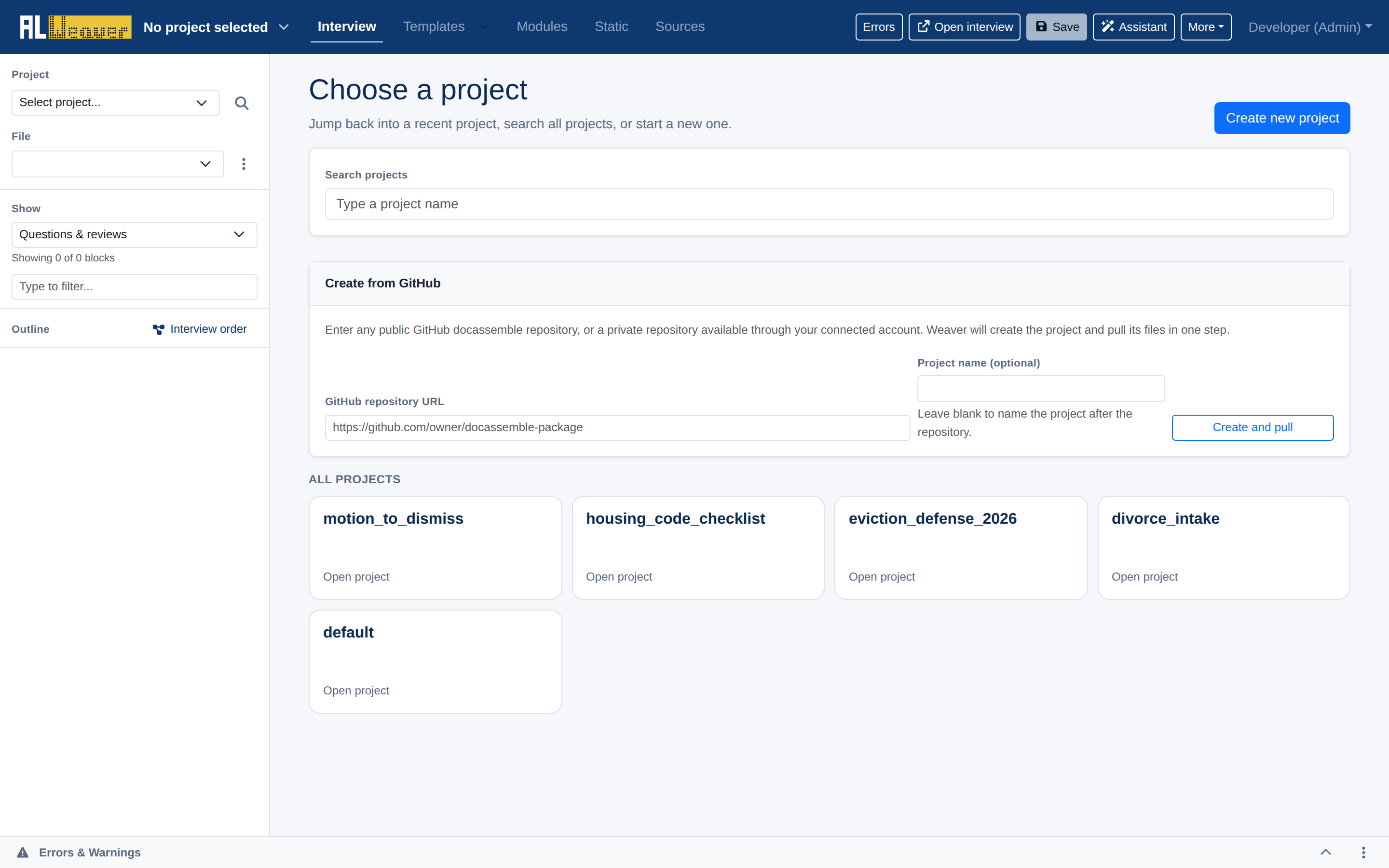
When you open the Weaver, you can select an existing Playground project, start a new project, or clone a repository from GitHub.
Once inside a project, the interface is organized into intuitive work areas designed for rapid authoring:
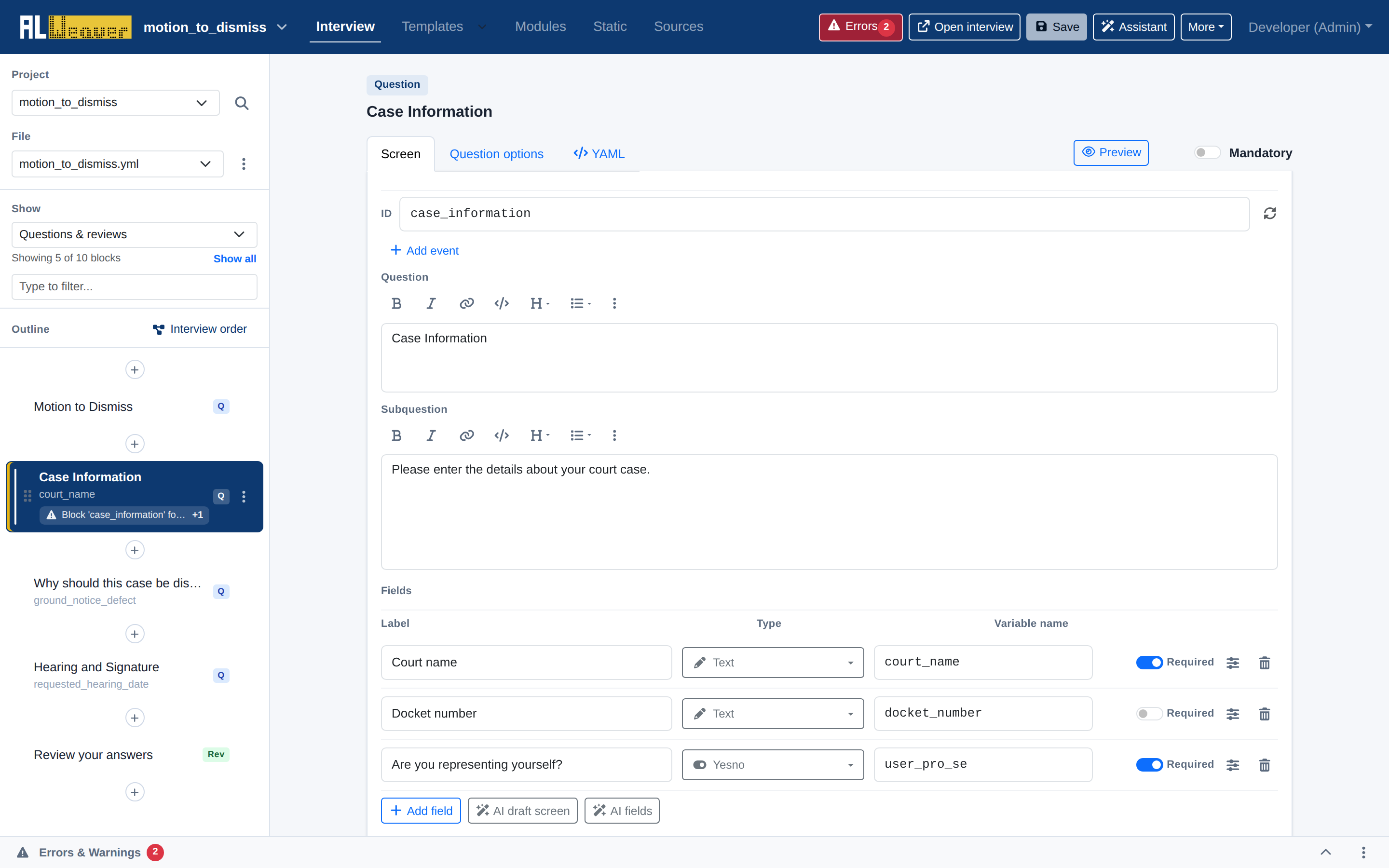
- Top navigation bar:
- View tabs:
- Interview: Visual block editor and outline for interview screens and code blocks.
- Templates: Document template manager and
ALDocumentBundlesetup. - Modules: Python modules and custom business logic.
- Static: Static assets (images, stylesheets, custom JS).
- Sources: CSV data tables and lookup files.
- Errors badge: A live count of validation issues next to the Errors button; click it to open the Errors & Warnings drawer.
- Open interview: Launches the current interview in a new tab for live runtime testing.
- Save: Writes all changes to the server (
Ctrl+SorCmd+S). - Assistant: Toggles the AI editing assistant panel, when it is enabled on your server.
- More menu: Access YAML source, AssemblyLine settings, Open in Playground, Commit to GitHub, Pull changes from GitHub (once a repo is linked), and Switch project.
- View tabs:
- Left navigation rail:
- Project and file selectors: Switch between Playground projects and between YAML interview files in the project.
- Find or replace across project: The magnifying-glass icon next to the project selector opens project-wide find and replace.
- Show filter: Filter the outline by block type — question/review screens, code, objects, events, sections, metadata, modules, templates, tables, all blocks, or disabled blocks.
- Search filter: Type to filter blocks in the outline by title or variable name.
- Interview order button: Opens the visual flow sequencer.
- Block outline: Drag-and-drop tree of all blocks in the active file with quick-add (
+) buttons between blocks.
- Central canvas:
- The active block editor with tabs for Screen, Question options, and YAML, plus a separate Preview button.
- Bottom drawer:
- Collapsible Errors & Warnings panel displaying static analysis findings.
Explore the Weaver documentation
Follow the guides below to master each stage of building a guided interview:
- Question screens and fields — Author interactive question screens, field types, labels, help text, and show-if visibility logic.
- Live screen previews — Test screen UX in real time across desktop, tablet, and mobile viewports.
- Question library and people — Manage
ALPeopleListobjects and insert standardized questions for names, addresses, and accommodations. - Interview order builder — Visually structure the interview flow, loops, conditional branches, progress bars, and sections.
- Document bundles and templates — Configure
ALDocumentandALDocumentBundledownload packets with conditional inclusion rules. - Review screens — Synchronize summary review screens with interview questions.
- Diagnostics and refactoring — Run static quality checks, refactor variables safely across YAML and DOCX, and edit raw YAML.
- GitHub and publishing — Publish packages, manage branches, and commit to GitHub directly from the Weaver.
- Authoring checklist — Review the start-to-finish quality checklist before deploying your interview.