Publishing and version control with GitHub
When your interview is ready for user testing, peer review, or production deployment, you can commit and push it directly to GitHub without leaving the Weaver.
Click More $\to$ Commit to GitHub to open the publishing modal:
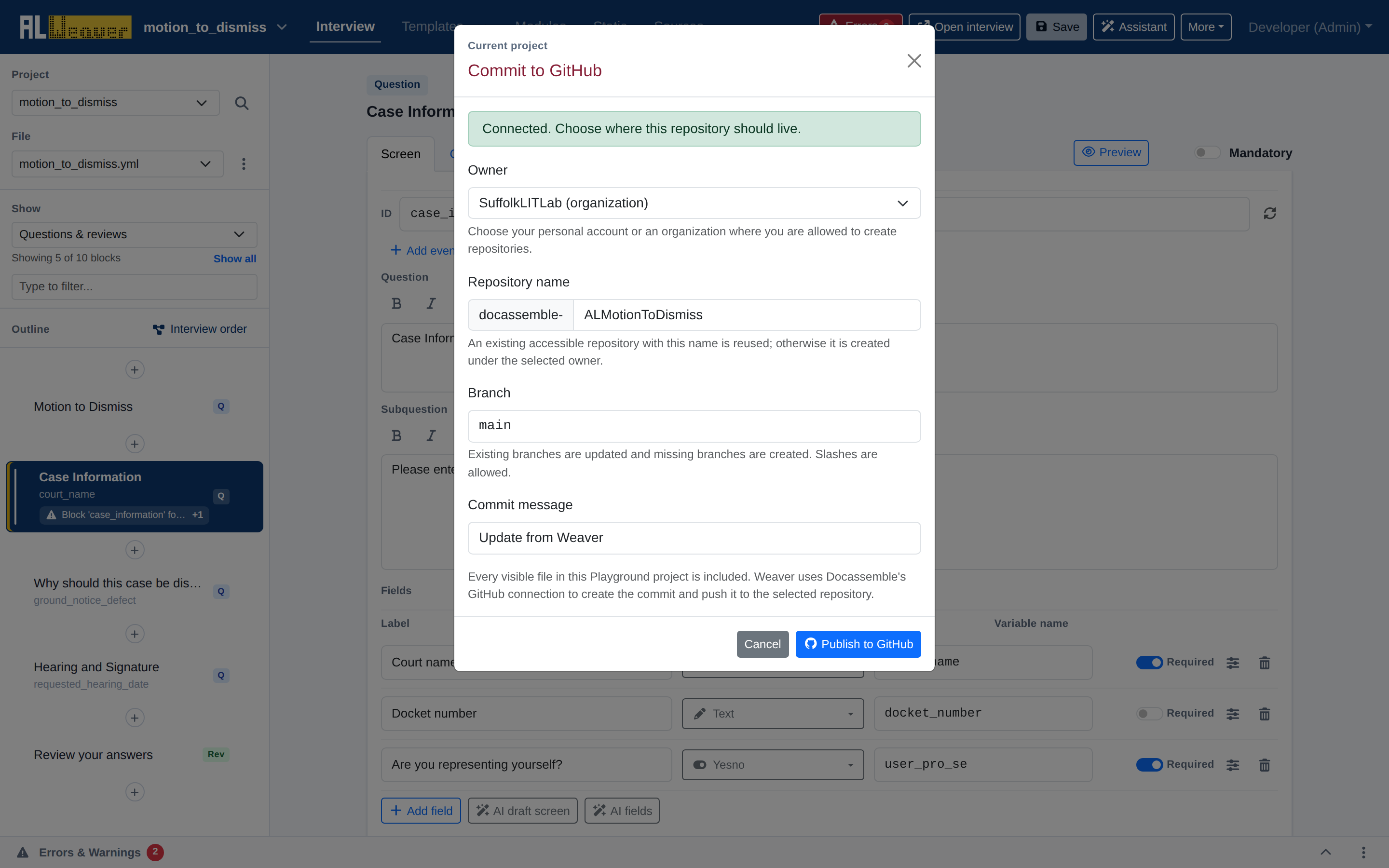
Publishing workflow
- Owner: Choose your personal GitHub account or an organization account (such as
SuffolkLITLab) among the ones your Docassemble server's GitHub integration can access. - Repository name: The
docassemble-prefix is fixed; type the rest of the name (e.g.ALMotionToDismiss). An existing accessible repository with that name is reused, otherwise a new one is created under the selected owner. - Branch: Defaults to
main. Type an existing branch name to update it, or a new one to create it. - Commit message: Defaults to "Update from Weaver" — replace it with a concise, descriptive summary of the changes.
- Publish to GitHub: Every visible file in the project is included. The Weaver creates the commit, pushes it, and shows links to the repository and the commit.
Pulling updates from GitHub
If collaborating with a team, you can pull remote updates directly into your Playground project:
- Click More $\to$ Pull changes from GitHub (this item only appears once the project is linked to a repository).
- The Weaver fetches the latest commits from your upstream repository branch and refreshes your visual project files.
Next steps
- Run through the Authoring checklist to confirm all quality checks before launching.